

EventBlitz
Fast, searchable Windows Event Log viewer: merged channels, live tail, full-text search
| Ctrl+L | live tail on/off | | Ctrl+Shift+A | alerts page |# EventBlitz
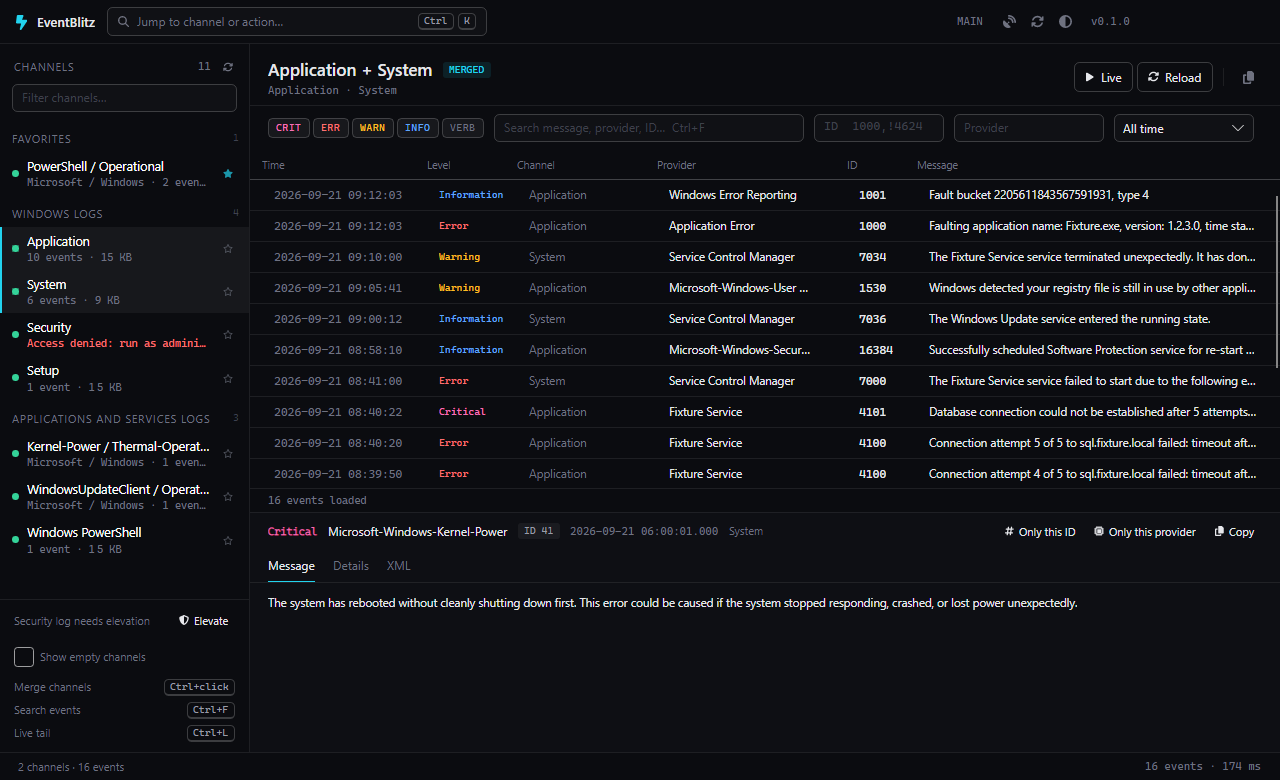
A fast, searchable viewer for the Windows Event Log — the built-in Event Viewer rebuilt as a dense, keyboard-first ops console. Avalonia · .NET 10 · one portable exe.
What it does
- Every channel of the machine in one sidebar: Windows Logs, Applications and Services Logs, your favourites pinned on top, with record counts and sizes. Empty channels are hidden until you ask for them.
- Merged view — Ctrl+click several channels and read their events as one list in time order (Application + System + Kernel-Power/Thermal, for example).
- Filters that stream — level chips, time range, event IDs (
1000, 1001-1010, !4624), provider, and a full-text search that walks the whole log and shows matches as they are found, with a live "scanned" counter and a Stop button. Level, time and IDs are pushed down to the Event Log as XPath; text runs on the formatted message. - Live tail (Ctrl+L) — new events are inserted at the top the moment they are written.
- Alerts (Ctrl+Shift+A) — subscribe to channels with a level / ID / provider / text condition; a rule watches in the background whatever you are looking at and fires a sound, a toast in the corner and a taskbar flash. "New from current view" makes a rule out of the channels and filter on screen; every hit is listed and opens the event on click.
- Detail pane with the message, every system property (task, keywords, user, PID/TID, activity ID…) and the raw XML; "only this ID" / "only this provider" turn an event into a filter with one click.
- Command palette (Ctrl+K) across channels, filters and actions; theme switch System / Light / Dark (System follows Windows live); restart as administrator when the Security log is needed.
- Self-updating from GitHub Releases (stable = tagged releases, nightly = every push to master).
Run
Download EventBlitz-win-x64.zip from the latest release,
unzip and start EventBlitz.exe. No installation; settings live in %APPDATA%\EventBlitz, the app's own log in
%LOCALAPPDATA%\EventBlitz\logs. EventBlitz --health prints the health document.
Build
git clone https://github.com/TomasBouda/EventBlitz.git
dotnet build EventBlitz.slnx
dotnet test tests/EventBlitz.Core.Tests/EventBlitz.Core.Tests.csproj
dotnet run --project src/EventBlitz.App
src/EventBlitz.Core reads the log (System.Diagnostics.Eventing.Reader), builds XPath from the filter and merges
channels; src/EventBlitz.App is the Avalonia UI. The self-update library TomLabs.AutoUpdate.Avalonia comes from nuget.org.
Keyboard
| Key | Action |
|---|---|
| Ctrl+K | command palette |
| Ctrl+F | search events |
| Ctrl+L | live tail on/off |
| F5 | reload |
| Esc | stop a running search |
| Ctrl+C | copy the selected event |
| Ctrl+Shift+X | clear filters |
| Ctrl+Shift+L | theme: system → light → dark |
| Ctrl+click | merge channels |
License
MIT. Alert sounds from freesound.org: "Message Notification 4" by AnthonyRox (s/740423, CC0)
and "Error Bleep 1" by original_sound (s/372200, CC BY 3.0);
the sources live in tools/sounds and tools/Make-Sounds.ps1 converts them to the shipped assets.
Changelog
Changelog
0.1.2 — 2026-09-24
- Changed: the self-update library comes from nuget.org (TomLabs.AutoUpdate 0.3.2) instead of a git submodule; updates work as before.
0.1.1 — 2026-09-24
- Changed: the theme switch now has a System option that follows Windows live; earlier Light/Dark choices were reset to System once.
- Added: the header button shows the current mode (half circle = System, sun, moon); the command palette can set each mode directly.
0.1.0 — 2026-09-21
- Added: sidebar with every channel of the machine (Windows Logs, Applications and Services Logs, favourites), sizes and record counts, search, empty channels hidden by default.
- Added: merged view — Ctrl+click several channels and see their events in one time-ordered list.
- Added: filter strip with level chips, time range, event ID list (
1000, 1001-1010, !4624), provider and full-text search that runs through the whole log, streaming matches as they are found. - Added: live tail (Ctrl+L) that inserts new events at the top as they are written.
- Added: alerts (Ctrl+Shift+A): rules on chosen channels with level, event ID, provider and text conditions run in the background whatever is on screen and fire a sound (a distinct built-in sound per level, or any WAV), a toast in the corner and a taskbar flash; "New from current view" turns the current channels and filter into a rule, hits are listed and open the event on click, mute switch and a per-rule 3 s sound cooldown.
- Added: detail pane with the syntax-highlighted message (labels, numbers, paths, GUIDs, problem words) and event XML, all system properties, plus one-click "only this ID / provider" filters and copy.
- Added: "Restart as administrator" right in the access-denied banner; clear buttons (×) in every search box.
- Added: command palette (Ctrl+K), light/dark theme, restart as administrator for the Security log.
- Added: self-update from GitHub Releases (stable and nightly channels), application log page,
--healthand headless automation channel.