

ForeverPresence
Shows your WoW Forever character on your Discord profile
Screenshots
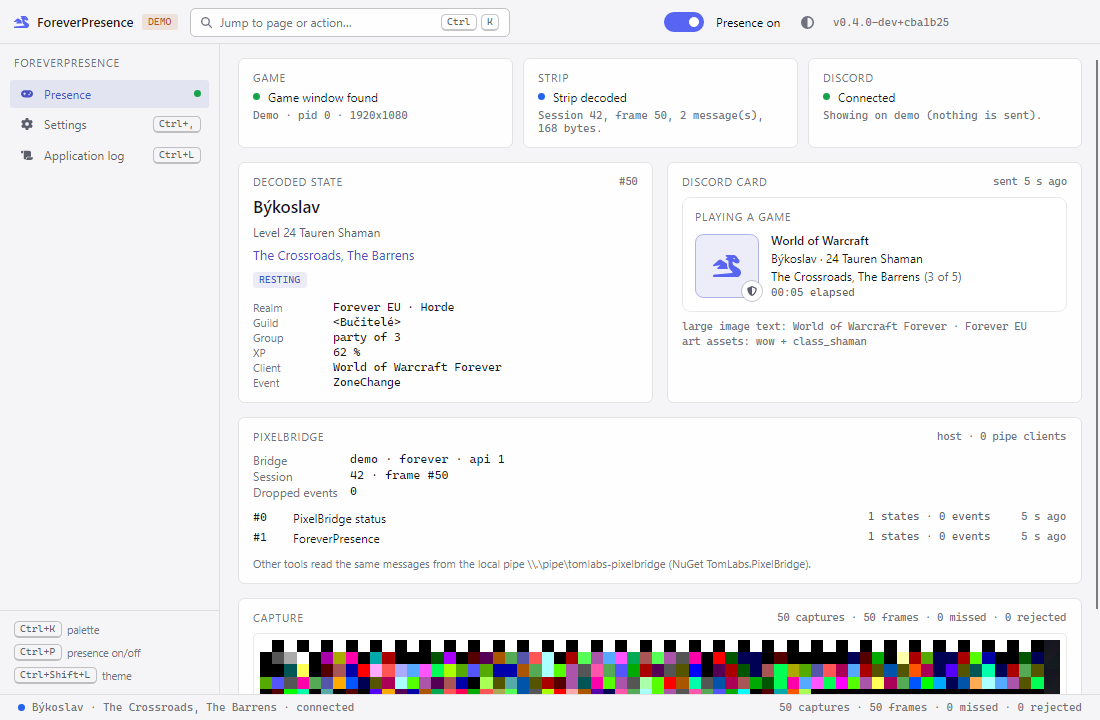
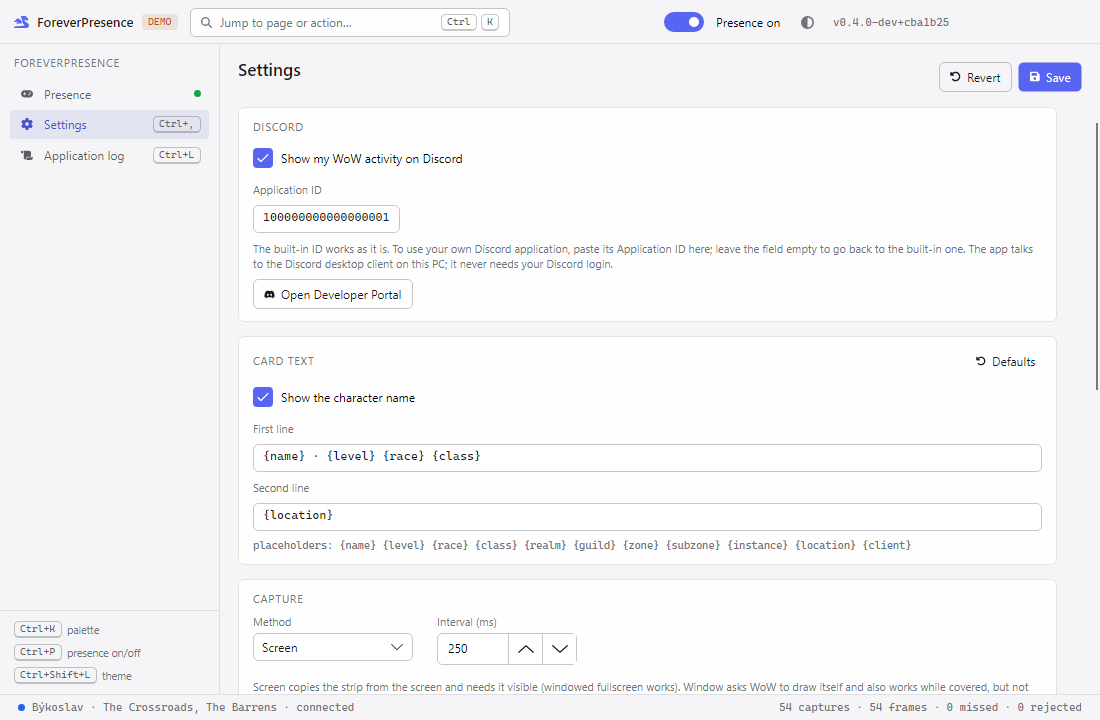
ForeverPresence shows the World of Warcraft character you are playing on your Discord profile: name, level, race and class, the zone or instance, your group size and how long you have been playing.
You need three things: this app, and two addons from CurseForge, ForeverPresence and PixelBridge. Discord must run as the desktop app on the same PC.
- Works with WoW Forever.
- Runs in the notification area and updates itself.
- Choose what the card says with simple templates, and hide your character name if you prefer.
- A preview in the app shows the card before Discord does.
How it works: addons cannot reach anything outside the game, so PixelBridge draws a small strip of coloured cells in the top-left corner, and the app reads the strip from the screen.
What you should know:
- The addon puts this on the strip: character name, realm, level, class, race, faction, zone, subzone, instance, group size, status (such as dead, AFK or in combat), XP percent, guild and client, plus level ups, deaths and revives. The app passes the card to the Discord client on your PC. It never asks for a Discord or Battle.net login.
- Nothing sends input to the game: no keys, no clicks, no changes to the game's memory or files.
- Reading the screen from outside the game is the technique pixel bots use. I do not know how Blizzard treats this on WoW Forever, so decide for yourself whether you want to use it.
How to start: install both addons, download and run the app, then start Discord and the game.
Changelog
Changelog
All notable changes to ForeverPresence. Newest first.
0.4.0 — 2026-11-06
Features
- The app is on the TomLabs app store and updates itself; both addons are on CurseForge.
- It works out of the box: a built-in Discord application replaces the setup in the Developer Portal. Your own application stays optional, and an empty field goes back to the built-in one.
Changes
- New icon for the app and the addon, which also shows it in the AddOns list.
- The README starts with what a player needs: the app and the two addons.
tools/Build-Addon.ps1has no default 1.12 client any more and can write release zips with-Zip.
Bug fixes
- The PixelBridge card showed version 0.0.0 on WoW Forever; with the PixelBridge addon 0.3.1 it shows the real one.
- No character reached the app on WoW Forever, so the Discord card stayed empty: the addon failed on a second value returned by a game call.
- The addon stayed silent when it could not build or send the character state; it now says why in chat, and
/fpresno longer claims the state was sent.
0.3.0 — 2026-10-30
Features
- ForeverPresence works next to other apps that use PixelBridge. The first one started captures the strip; the others read it from that app and take over within about 2 s when it closes.
- The PixelBridge card shows whether this app is the bridge host or a client of another app.
Changes
- The PixelBridge packages now come from nuget.org; the temporary local package source is gone.
- PixelBridge moved to its own repository and comes as the NuGet packages
TomLabs.PixelBridgeandTomLabs.PixelBridge.Host0.3.0 (not on nuget.org yet). tools/Build-Addon.ps1builds the PixelBridge addon from the PixelBridge repository, which must sit next to this one.- The PixelBridge pipe status now carries the session and the consumer count.
Bug fixes
- None.
0.2.0 — 2026-10-30
Features
- PixelBridge, a new standalone addon, owns the strip. Any addon can register a channel and send states (the latest value wins) and events (each delivered once). It works on WoW Forever and 1.12.
/pbridgecommand for the strip: show, always on, cell size, rows, frame hold, linger, heartbeat, on/off and status.- Events are sent in 3 frames and delivered once. When an addon sends too many, the oldest are dropped and the drop is counted, never silent.
- The tray app is now the bridge host. Other programs on the PC can read every addon's data over the named pipe
tomlabs-pixelbridge, and get the latest states as soon as they connect. TomLabs.PixelBridge.NET library (NuGet package, not published yet) with the decoder, payload helpers and the pipe client.- The Presence page has a PixelBridge card: bridge version, session, dropped events and each channel's traffic.
- Level up, death and revive also arrive as events, so none is missed when the state changes again right after.
Changes
- ForeverPresence is now a producer on PixelBridge channel 1 and needs the PixelBridge addon. Without it, it prints a warning in chat.
- Strip settings moved from
/fpresto/pbridge;/fpresis now show, on, off and status./fpres offclears the presence on Discord. - Protocol v2: a frame carries several messages, and the strip uses colour cells, with 6 rows (278 bytes) by default. A 0.1.0 addon is no longer read; update both addons together.
- One set of addon files for both clients, with a TOC per client.
- New app icon: Tomáš's green-flame lantern (window, tray, exe and the NuGet package); small sizes are cropped to the lantern so it stays readable at 16 px.
- The app captures every 100 ms while the strip is visible, so events arrive faster.
Bug fixes
- A frame captured several times no longer counts as several updates. Frames the app missed are counted on the Presence page.
0.1.0 — 2026-10-30
Features
- WoW addon (WoW Forever and a 1.12 port) that draws a small pixel strip in the top-left corner with your character, level, class and race, zone and subzone, instance, dead/ghost, AFK/DND, combat and group size.
- The strip shows for a moment on a change (login, zone, level up, death, revive, AFK) or on
/fpres, then hides;/fpres alwayskeeps it on screen. - Tray app that finds the WoW window, reads the strip and shows the character on your Discord profile as Rich Presence.
- Presence page with the game, strip and Discord status, the decoded character, a preview of the Discord card and a magnified view of the captured strip.
- Settings for the Discord Application ID, the two card lines (templates with placeholders), hiding the character name, capture method and interval, extra game executable names, close to tray and log level.
- Application log page with live events and the daily log files.
- System / Light / Dark theme, Ctrl+K command palette, presence on/off from the header, the tray menu or Ctrl+P.
ForeverPresence --healthprints the health document (Degradeduntil an Application ID is set).
Changes
- None yet; first release.
Bug fixes
- None yet; first release.